01
QA teams drowning in backlog
Current dragRegression smoke is trapped behind engineering tickets.
Testorim moveTurn repeated release checks into saved procedures.
Testorim is an agentic AI QA tool that tests your website from a plain-English description. No code required. It spins up Chromium, drives it like a real user, captures everything, and writes up what actually happened: video, trace, accessibility scan, console errors, the lot.
A sentence in, a real browser run, a pass or fail for every step, then saved and put on a schedule. Recorded from the app, not animated.
Works with the tools you already use
 Slack
Slack GitHub
 GitHub Actions
 npm
npm PyPI
PyPI pytest
 Playwright
 Chrome
 Firefox
 Safari
 Claude
 MCP
MCP Claude Code
 Codex
Codex Cursor
 GitHub Copilot
 Windsurf
 Antigravity
 Gemini CLI
Product names and logos belong to their owners; shown to indicate compatibility.
No DSL, no test framework, no selectors. You write what you'd tell a new hire on day one. Testorim's planner picks the right Playwright primitives, finds elements with cascading strategies, and self-heals when the page changes.
Not a headless DOM simulator. Tests run in the same engine your users see, with a real cookie jar, real CORS, real navigations. On the Team plan, saved tests can also replay in Firefox and in WebKit, the engine behind Safari, for the bugs Chromium hides.
Every run finishes with an AI summary that quotes specific failures, plus the artifacts to back it up. One click and you have a Jira-ready ticket with reproduction steps, expected vs actual, and links to the video and trace.
Failed: the checkout button rendered but the POST /api/orders silently 500'd. UI showed the success page, but no order row was created.
The /api/orders handler at backend/src/routes/orders.ts:42 is throwing on a missing Stripe customer id. Add a null check and return 4xx instead of 500.
Both produce a passing run, a video, and a report. One of them you can write while you're half-asleep.
import { test, expect } from "@playwright/test";

test("user can sign in", async ({ page }) => {
  await page.goto("https://your-app.com/login");

  await page
    .getByRole("textbox", { name: /email/i })
    .fill("test@example.com");

  await page.getByRole("button", { name: /^continue$/i }).click();

  await page
    .getByRole("textbox", { name: /password/i })
    .fill(process.env.PASSWORD!);

  await page.getByRole("button", { name: /^continue$/i }).click();

  await expect(page).toHaveURL(/\/dashboard/);
  await expect(
    page.getByRole("heading", { name: /welcome/i })
  ).toBeVisible();
});"Sign in with test@example.com and verify the dashboard loads."
The chat input is the input. Anything between a one-line smoke test and a fifteen-step checkout walkthrough. Testorim's planner figures out the steps. No DSL, no selectors, no "wait for..." gymnastics.
"Go to /login, sign in with test@example.com, verify the dashboard loads."
Steps stream onto your screen as they execute. Screenshots refresh twice a second. If something fails, the agent stops cleanly, with no zombie cursor flailing through three more steps after the page already broke.
Loved the run? One click and it becomes a saved procedure that replays its stored steps instead of making a fresh plan. Paid plans pay cents per re-run. Hated it? Walk away. Nothing was saved.
Your agent writes the change, then asks Testorim whether the site still works. The same plain-English test runs in a real browser and comes back as a verdict, with the failing step, who was at fault, and a video and trace.
How the MCP server worksclaude mcp add testorim -e TESTORIM_API_KEY=tst_live_... -- npx -y @testorim/cli mcpWorks with
 Claude Code
 OpenAI Codex
 Cursor
 GitHub Copilot in VS Code
 Windsurf
 Google Antigravity
 Gemini CLI
Product names and logos belong to their owners; shown to indicate compatibility.
Click the Testorim icon on any public site and write what should be true. Testorim opens that site's project with your test ready, so one more Enter runs it in a real browser.
Add to ChromeFree extension. Runs use your Testorim plan.
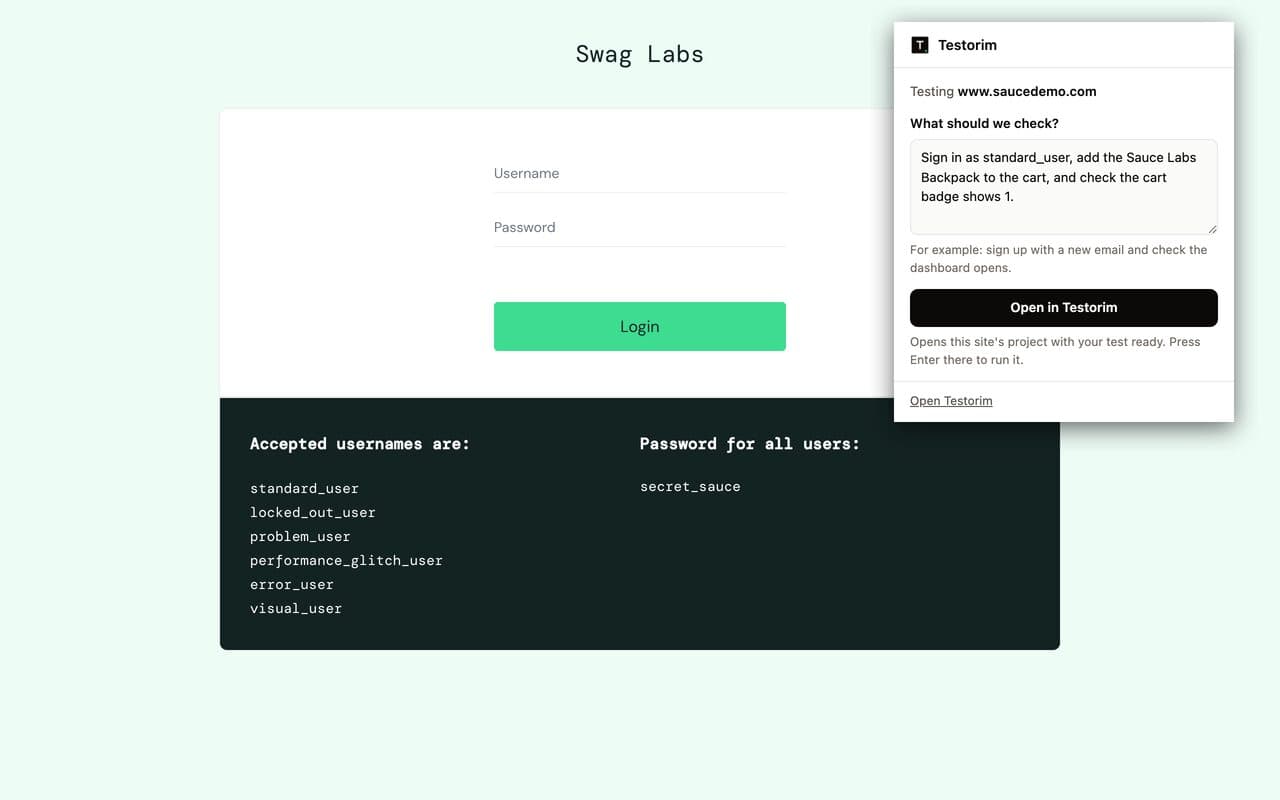
Testorim is not trying to replace test engineers. It is for teams whose first problem is coverage throughput: too many important flows, not enough automation time.
Current dragRegression smoke is trapped behind engineering tickets.
Testorim moveTurn repeated release checks into saved procedures.
Current dragLaunch confidence depends on someone manually clicking the app.
Testorim moveDescribe the path once, then replay it before every launch.
Current dragYou want speed now without giving up code ownership later.
Testorim moveUse no-code for discovery, export important flows to Playwright.
What should we check?
Describe a user flow. The agent plans and executes it.
navigate /login
type email field
click Place order
assert receipt
Checkout receipt loads after payment.
Three concrete commitments, not vague reassurances. Each one is backed by how the system is actually built, and the third has the encryption keys to prove it.
Tests, instructions, screenshots, network captures: none of it goes into a training set. Not ours, not the model providers' (we're on enterprise API tiers with training off). What you run today doesn't shape what anyone else sees tomorrow.
Test data lives inside your workspace, scoped to your organization at the database level. We don't sell to third parties, syndicate aggregate data, or grant any human at our company access without a support ticket from you and a clear reason.
Login storage state, environment cookies, database credentials, and Slack bot tokens are AES-256-GCM encrypted before they touch the database. Even if our database was compromised tomorrow, the keys to your apps wouldn't be.
No. Testorim is an independent AI browser QA product for plain-English web testing. It has no affiliation with Testim. Testorim turns a described web flow into a browser run, then returns evidence such as video, trace, accessibility findings, console errors and network details.
Yes. Testorim first resolves a control by stable signals such as role, label, placeholder and visible text. If those do not find the intended control, it can use AI-assisted healing against the live page; the recovery is recorded with the run rather than silently hidden. Saving a successful run stores its browser steps, so a replay does not make a fresh plan. A replay can still use the same healing fallback if ordinary resolution later fails.
Describe the critical browser flows in plain English, run each one once, and save the successful runs as procedures. Those procedures replay the saved browser steps from CI, on a schedule, or against a preview URL, while manual QA remains useful for exploration and product judgment.
No-code QA means you define test intent without writing test code. In Testorim, that means plain-English instructions; the system translates them into browser actions, runs them in Chromium, and returns evidence.
No. Record-playback usually replays brittle click coordinates or selectors. Testorim resolves targets from labels, roles, placeholders, and text with fallback strategies, so tests survive normal UI drift better.
Yes. You can use Testorim for fast coverage and export procedures as standalone Playwright specs when you want code-level ownership in CI.
Yes. Multi-step auth forms, dynamic pages, and long-running operations are supported. Reports include the exact run evidence so failures are reproducible.
No. It removes repetitive scripting work so QA and product teams can spend more time on test strategy, risk analysis, and release quality decisions.
A report plus artifacts: step log, screenshots, video, Playwright trace, console errors, network events, and accessibility findings when available.
Yes. Every account has a shared feature-request board in the app, under Help, Request a feature: ask for what you need, vote for what others asked, and get an email when something you backed is planned or shipped. Votes decide what gets built next.
$104,300 a year
The median US pay for software QA analysts and testers, before benefits and the months it takes to hire.
From $2,500 a month
Bug0's published flat fee; most services quote by sales. Vendr reports a median QA Wolf contract of $83,100 a year.
$19 to $199 a month
You describe each test in plain English. An AI agent runs it in a real browser and reports what happened.
A person still decides what matters; Testorim runs the checks you describe, on a schedule and on every pull request. See how it compares with QA Wolf, Momentic, mabl and others.
Sources: US Bureau of Labor Statistics, Bug0 pricing, Vendr.
Plans from $19 a month, with seats and parallel runs included. One-time credit packs for a busy week. Every plan is cancel any time.
One person, one product, real coverage.
For builders shipping every week.
For teams that ship together.
Join the waitlist and you are first in when sign-up opens, with a 3-day free trial. Plans from $19 a month.
Join the waitlist